Chat first. Add spec when the work needs traceability.
agenticflowx.github.io




Website · SDD Guide · Document Anatomy · Setup · Marketplace · Open VSX · Changelog · r/agenticflowx · GitHub
Chat · Intent controls · History · Code / Explore / Spec · AFX Previewer · SDD Studio · Workbench · JSON Canvas · Skills · Pi · broad provider catalog
AgenticFlowX is a VS Code extension for AI coding that starts as a normal chat assistant and grows structure only when the work earns it.
Most days, it is chat, file context, right-click editor actions, model switching, and follow-up. When a change needs a trail, AFX gives you spec-driven development inside the same VS Code sidebar: requirements, design, tasks, approvals, traceability, history, notes, boards, journals, and a portable project canvas.
Why bother with specs if AI can just write the code? This short IBM Technology video is a good primer on the risk AFX is designed around: What is AI Technical Debt? Key Risks for Machine Learning Projects.
Install from the VS Code Marketplace or Open VSX.
code --install-extension AgenticFlowX.agenticflowxThen open the AgenticFlowX activity bar icon, choose Settings → Models, connect a model, and start chatting.
Works in VS Code, VS Code Insiders, VSCodium, Windsurf, Gitpod, and Antigravity-compatible VS Code builds.
- Open the AgenticFlowX chat panel.
- Ask for help like you normally would, or mention files with
@path/to/file. - Right-click code when you want fast actions: send selection, explain, review, improve, generate tests, save to notes, or add an
@seelink. - Switch modes with
Cmd+Shift+Mon macOS orCtrl+Shift+Mon Windows/Linux:- Code for normal implementation.
- Explore for read-only investigation.
- Spec when the work needs requirements, design, tasks, and approval.
If you already know you want the workflow, run:
/afx-scaffold spec my-feature
That creates repo-local SDD files under docs/specs/, then AFX guides the next step from chat, the Previewer, and SDD Studio.
AFX does not force every task into a process. Start loose: ask about the repo, send a selection, mention files, switch models, and keep coding.
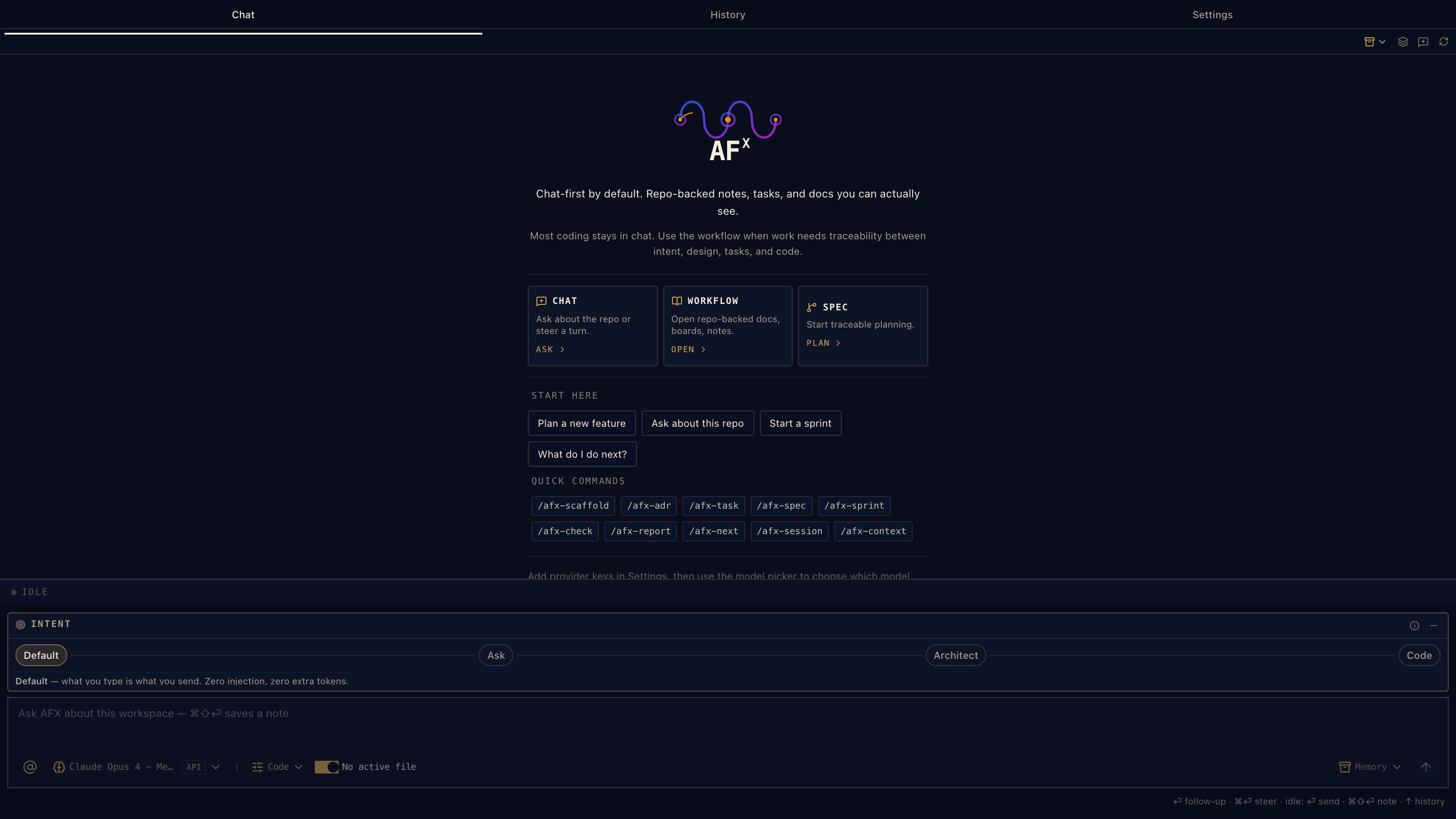
The composer has intent controls for how much structure a message should carry. Default adds no intent-specific steering; active-file context, mentions, workspace-mode guardrails, and runtime prompts can still add relevant context. Ask, Architect, Code, and PRD add lightweight steering when you want it.
When the selected model supports image input, the composer can attach screenshots and diagrams to a turn (including image-only messages). Text-only models are clearly marked and keep the attachment action disabled, so an unsupported request does not fail after you send it. Images are forwarded through both the bundled Pi SDK and the optional Pi RPC runtime, with staged attachments cleaned up when a send is rejected. Thinking-level controls, live usage counters, and usage warnings follow the capabilities reported by Pi instead of assuming every provider behaves the same way.
When the conversation touches documents, files, or workflow state, the UI keeps the useful next action close without turning the chat box into a control panel.
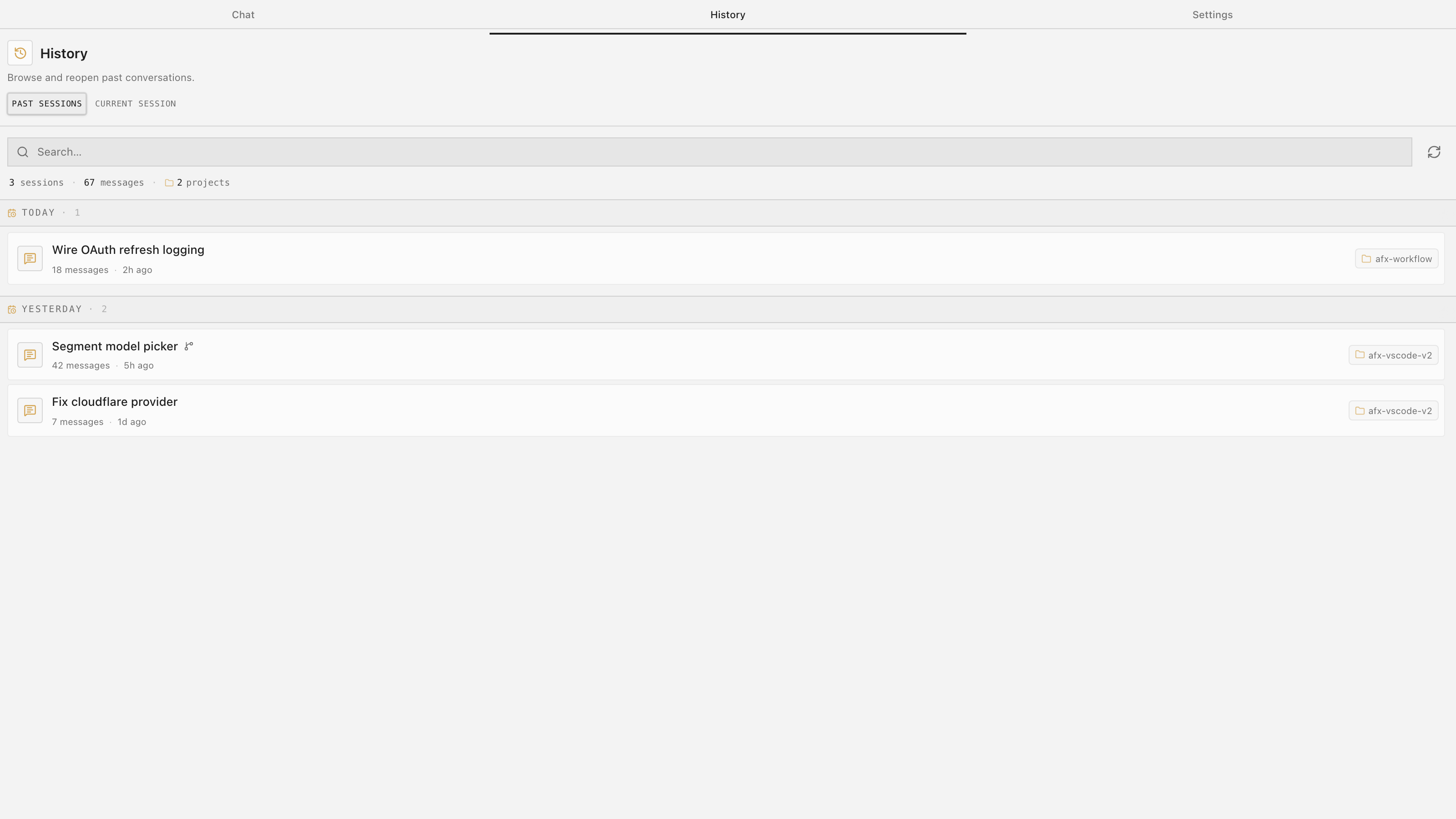
Past sessions are searchable, reopenable, renameable, exportable, and recap-friendly. Copy a recap when you want to hand context to another agent, another window, or future you. Retry a failed turn, cancel an in-flight request, and copy individual messages without losing the conversation trail.
History is not a separate project-management system; it is the conversation trail beside the work.
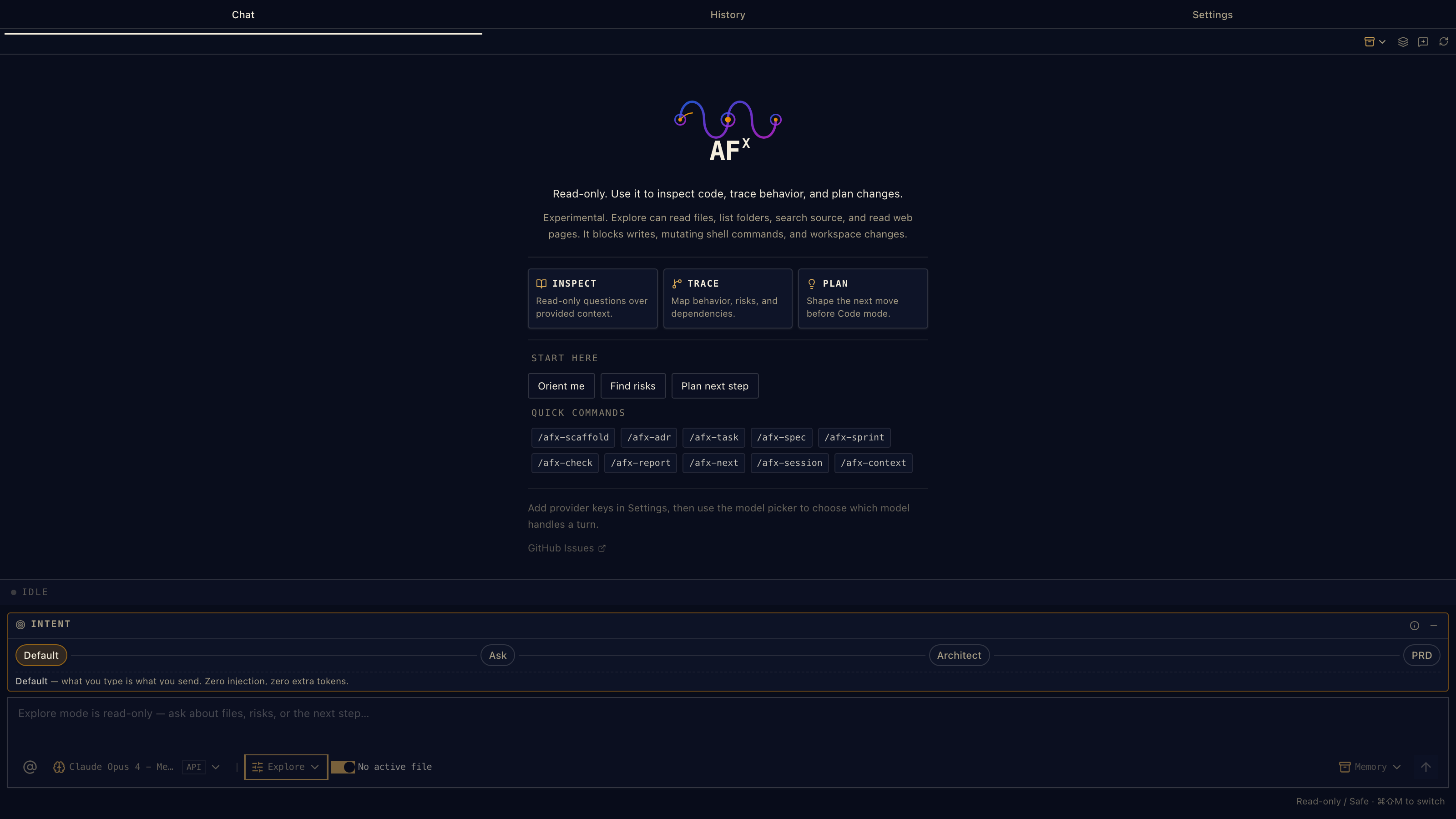
Code, Explore, and Spec are lanes, not separate products.
- Code is the default: edit, implement, debug, and run commands.
- Explore is enforced read-only: inspect first, plan safely, avoid accidental writes.
- Spec is planning-first: clarify requirements, shape design, break down tasks, and ship from the document.
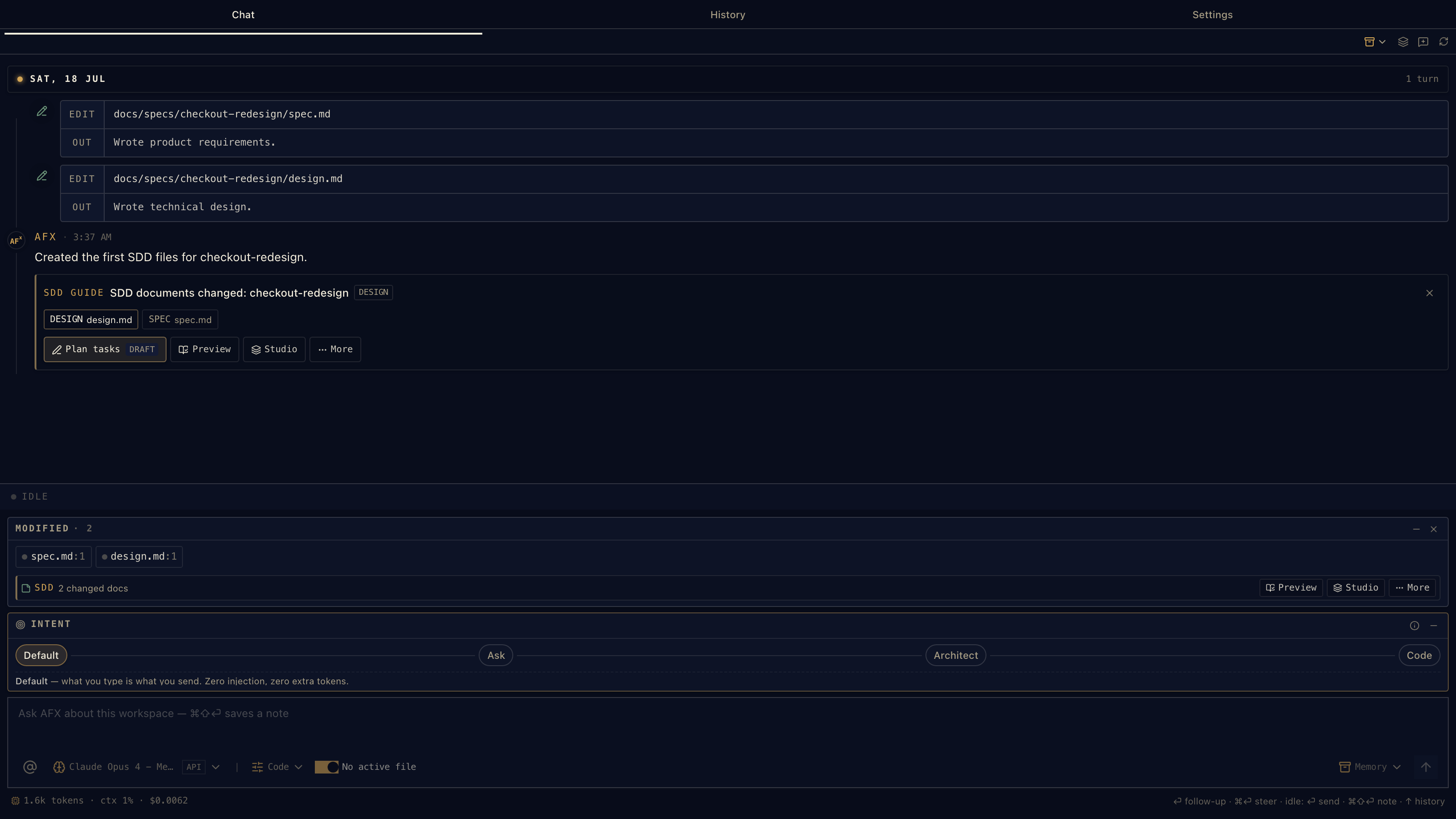
Spec-driven development should not feel like joining a methodology cult. In AFX, it is a guided lane inside chat.
The SDD guide watches the current spec, design, and tasks, then offers the actions that make sense now: refine, author, validate, review, approve, plan tasks, open Previewer, or continue in Studio.
Not every change needs four files. Use Dash for surgical fixes, Sprint for single-document feature work, and the full spec/design/tasks/journal shape when the work needs long-lived traceability.
AFX gives the same workflow discipline in three sizes. Pick the smallest shape that fits the risk; graduate up when the work grows. The important part is that the anchors survive: FR-N, NFR-N, [DES-*], task IDs like ### 2.1, @see links, and Work Sessions all use the same notation across the ladder.
For the long-form version, see the SDD Guide and Document Anatomy.
| Shape | Use it for | Files | What it contains | Approval model |
|---|---|---|---|---|
| Dash | Surgical fixes, bounded cleanup, known bugfixes | docs/specs/<feature>/<feature>.md |
Purpose · Tasks · Work Sessions | No approval block; progress is task state |
| Sprint | Most solo features and medium changes | docs/specs/<feature>/<feature>.md + journal.md |
References · Spec · Design · Tasks · Work Sessions | Frontmatter approval.spec/design/tasks, in order |
| Full spec | Multi-session, cross-cutting, risky work | spec.md · design.md · tasks.md · journal.md |
One formal lifecycle file per artifact | Per-file status and approval gates |
docs/specs/<feature>/

# Dash
└─ <feature>.md        # type: DASH

# Sprint
├─ <feature>.md        # type: SPRINT
└─ journal.md          # session continuity

# Full spec
├─ spec.md             # the WHAT
├─ design.md           # the HOW
├─ tasks.md            # the WHEN
└─ journal.md          # the WHY / history
The product contract: references, problem statement, users, user stories, functional requirements, non-functional requirements, acceptance criteria, non-goals, open questions, dependencies, and appendix.
Requirements carry stable IDs like [FR-1] and [NFR-2]. If a requirement changes, keep the ID. If a requirement is retired, do not silently renumber old IDs — code and tasks may still point at them.
The technical contract: architecture, data model, APIs, integrations, failure modes, security, testing strategy, rollout, and trade-offs.
Design sections carry anchors such as [DES-ARCH], [DES-API], and [DES-SEC], plus backlinks to the spec with @see spec.md [FR-1]. The design is where implementation reality belongs; changelog-style history belongs in the journal.
The executable plan. Tasks use stable IDs such as ### 2.1, checkboxes, acceptance criteria, file scopes, and @see references back to design/spec anchors.
Task actions in AFX can pick, code, verify, brief, or report status. Verification checks for evidence: files exist, @see backlinks are present, no stray TODO/FIXME markers, and the session was logged.
The journal keeps discussions, decisions, recaps, and captured prompts out of the living spec/design documents. Work Sessions are the append-only ledger for implementation evidence, with separate agent and human sign-off.
That split matters: the spec/design/tasks stay current, while the journal explains how they got there.
A Sprint keeps Spec, Design, Tasks, and Work Sessions in one document, gated by an approval: block in frontmatter. Approve in order: spec → design → tasks. Edit an approved upstream section and downstream approvals demote back to Draft.
When a Sprint outgrows itself, graduate splits it into spec.md, design.md, and tasks.md, promotes headings, retargets @see paths, and keeps IDs plus Work Sessions intact.
A Dash is Purpose + Tasks + Work Sessions. No status, no version, no approval block. It is for the work that deserves a record but not a ceremony.
Use Dash when the outcome is known, the rollback is bounded, the scope is small, and verification can be written as task criteria. Unknown root cause? Explore first, then Dash the fix.
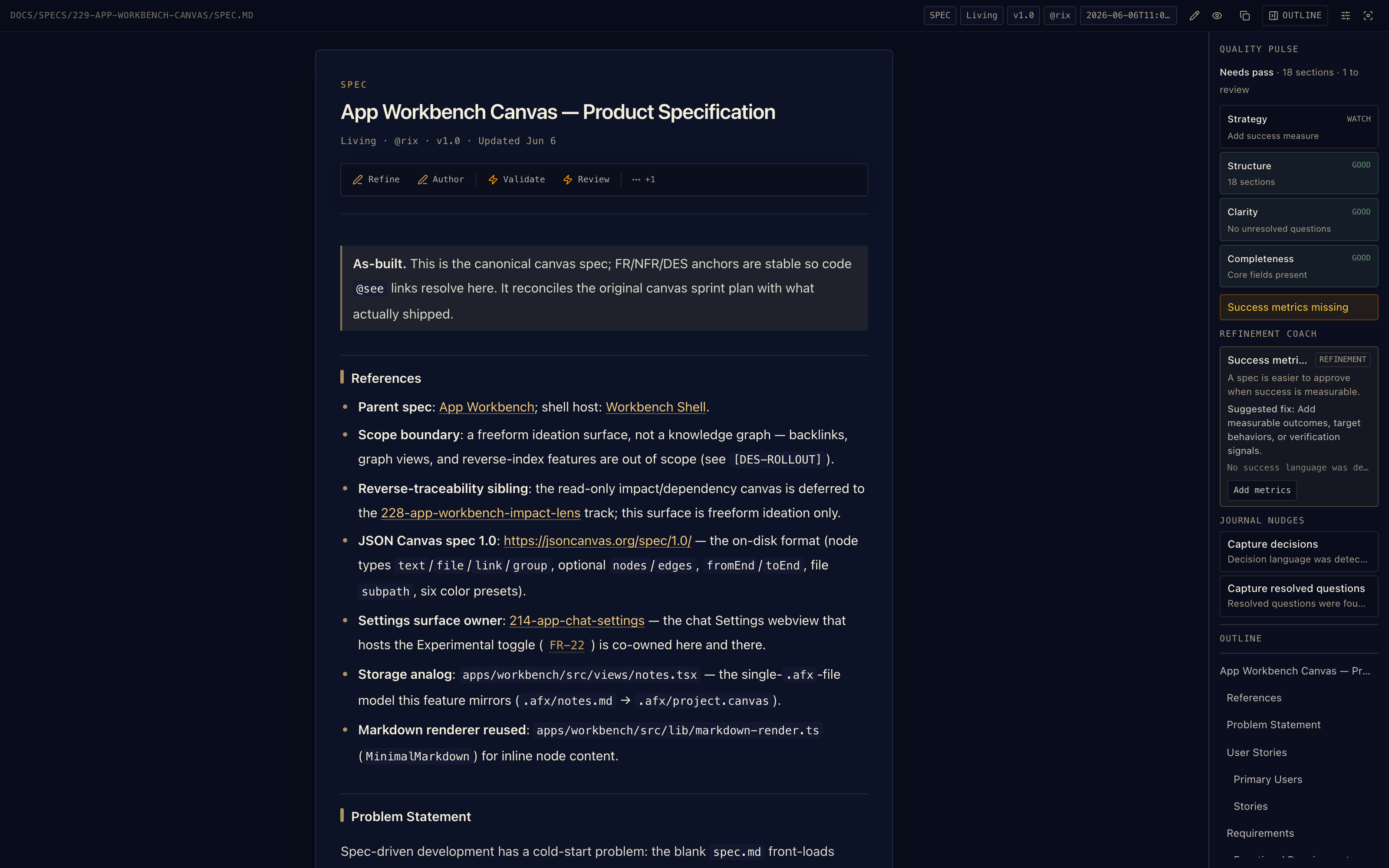
AFX Previewer turns repo markdown into a working surface. Specs, designs, tasks, ADRs, research notes, journals, and sprint docs render with workflow-aware toolbars.
Quality Pulse reviews the document as you write it — strategy, structure, clarity, completeness — and the Refinement Coach suggests the next fix. Read the source. Run the section action. Send a section back to chat. Keep the file plain markdown the whole time.
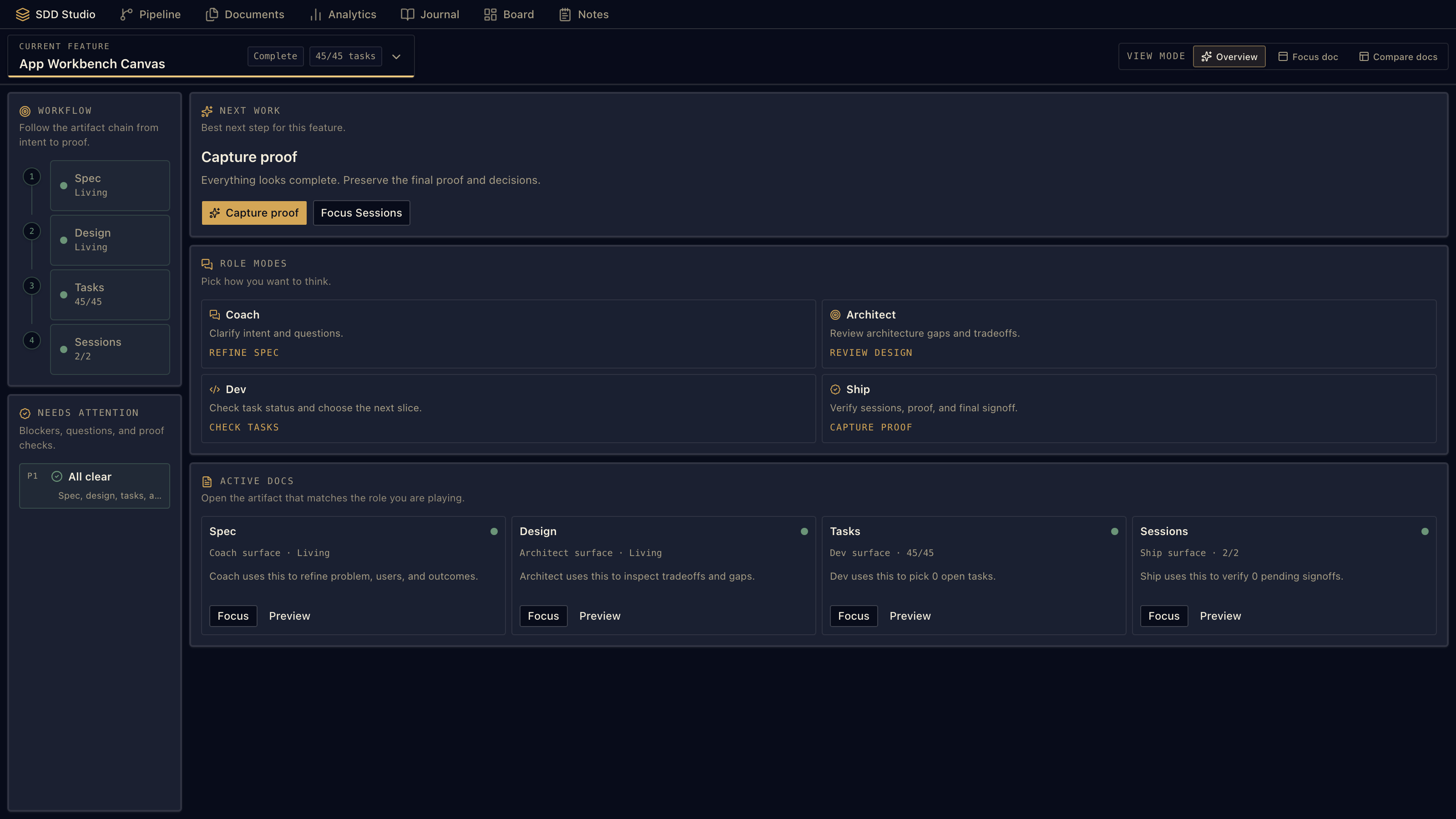
SDD Studio gives every feature a live board: spec, design, tasks, and work sessions. Use it when a change outgrows one chat turn and you need to see the whole chain.
It is built for the boring-but-critical parts of agentic work: What is approved? What is stale? What has evidence? What should run next? Focus a document, compare related docs, or continue from the inline action that matches the current stage.
Workbench is a set of repo-backed views over the files you already own: SDD Studio, Pipeline, Documents, Analytics, Journal, Board, Notes, and Canvas.
No hosted workflow database. No hidden project state. Just markdown, JSON Canvas, and VS Code surfaces over the repo.
If you want a quieter sidebar, hide the views you do not use with afx.experimental.workbenchHiddenViews. The files and commands stay available.
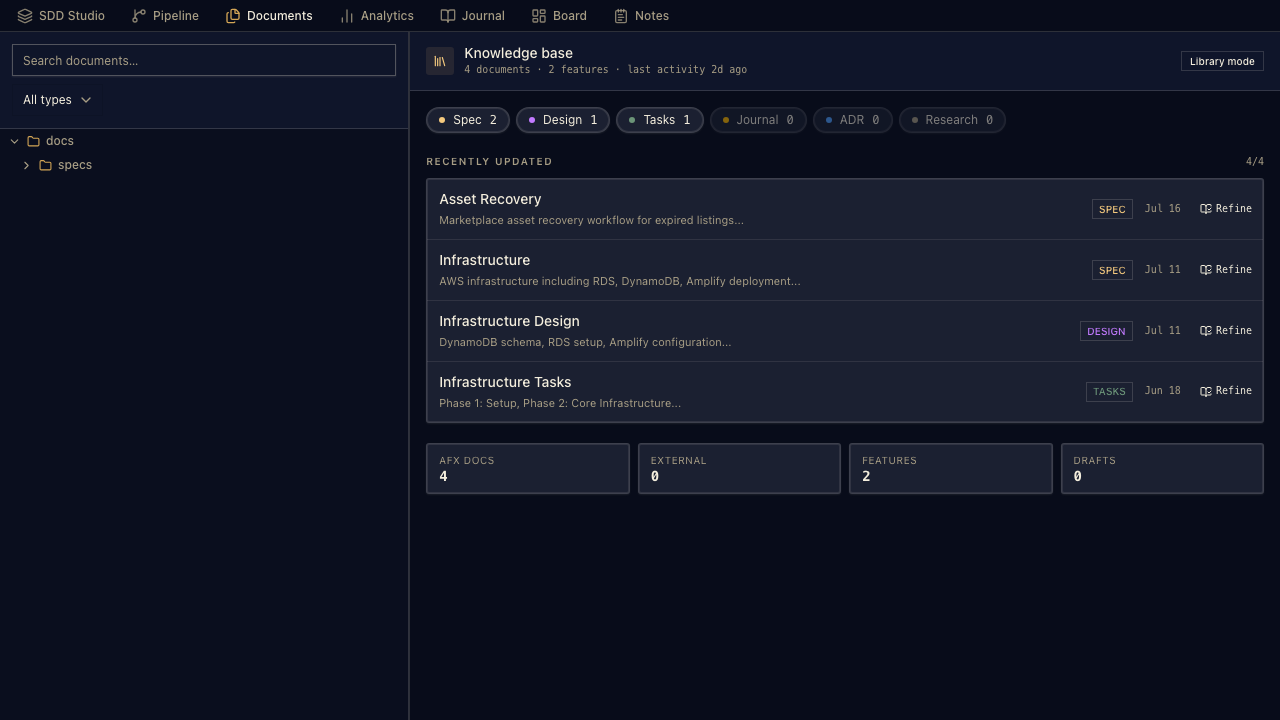
Three Workbench views make the repo easier to read at a glance:
- Pipeline: feature progress and next actions in one place.
- Documents: browse specs, designs, ADRs, journals, and research notes without leaving the panel.
- Analytics: trace health, velocity, task completion, feature-stage KPIs, and activity heatmaps.
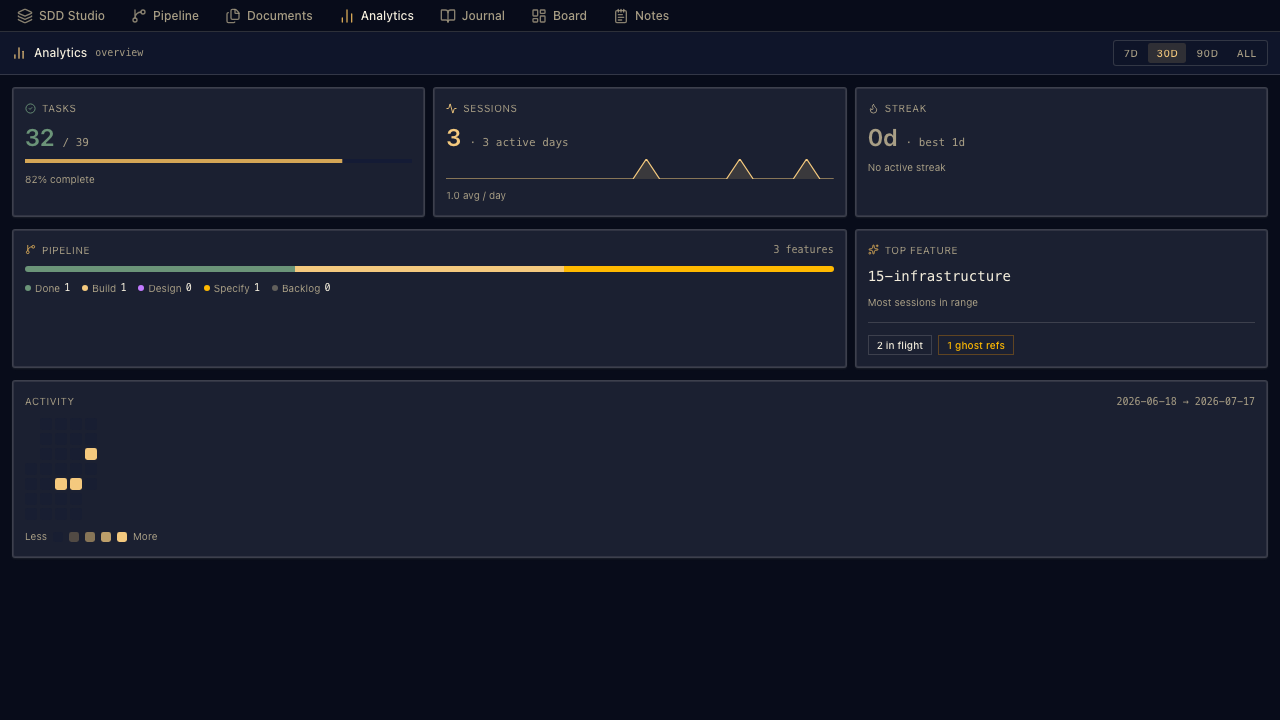
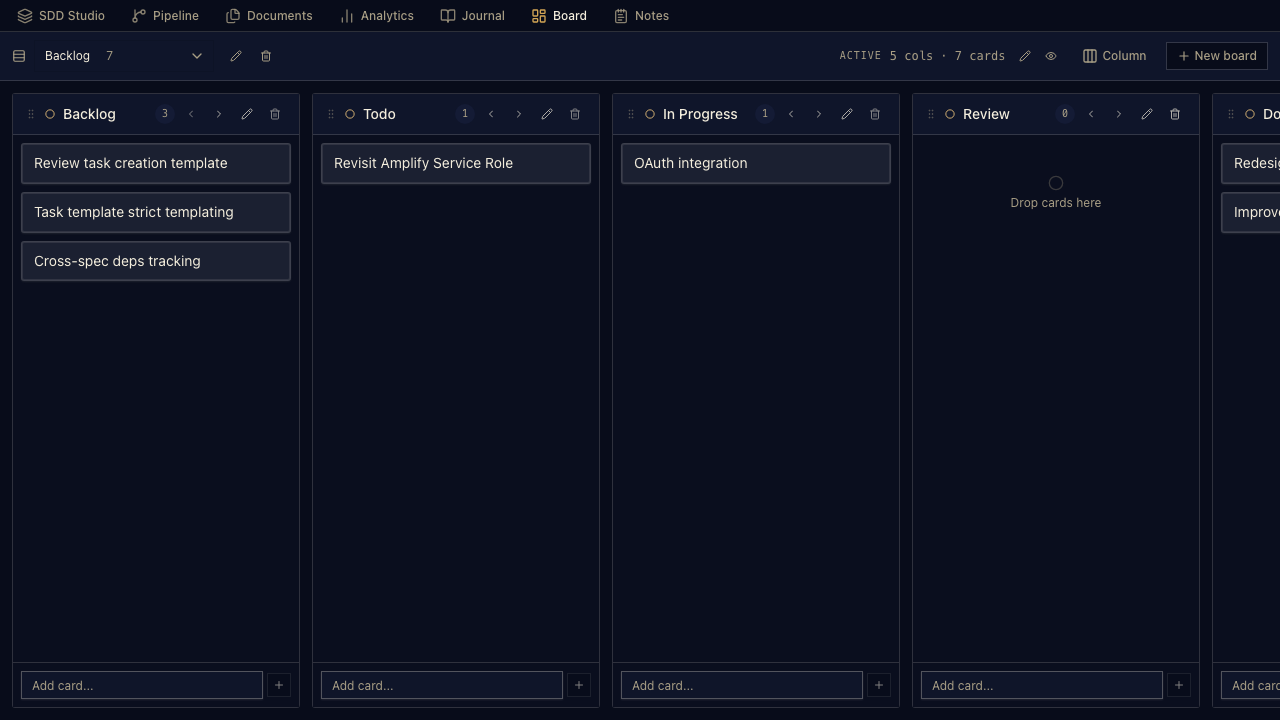
The everyday planning tools stay close to the work.
- Board: markdown-backed Kanban for feature flow, triage, and “what next?”
- Notes: quick captures with edit/delete and reader mode, saved under
.afx/. - Journal: append-only session memory so the next agent or human can resume with context.
Canvas is the experimental “architect brain” surface: freeform planning, spec maps, file cards, markdown references, labels, notes, images, URLs, and dependency views.
It is backed by .afx/project.canvas using the portable JSON Canvas format, with AFX metadata layered on top for commands, spec maps, presentation frames, and workflow actions. Open it in the Workbench tab or as a dedicated Canvas editor, keep it reviewable in git, and round-trip it with compatible canvas tools.
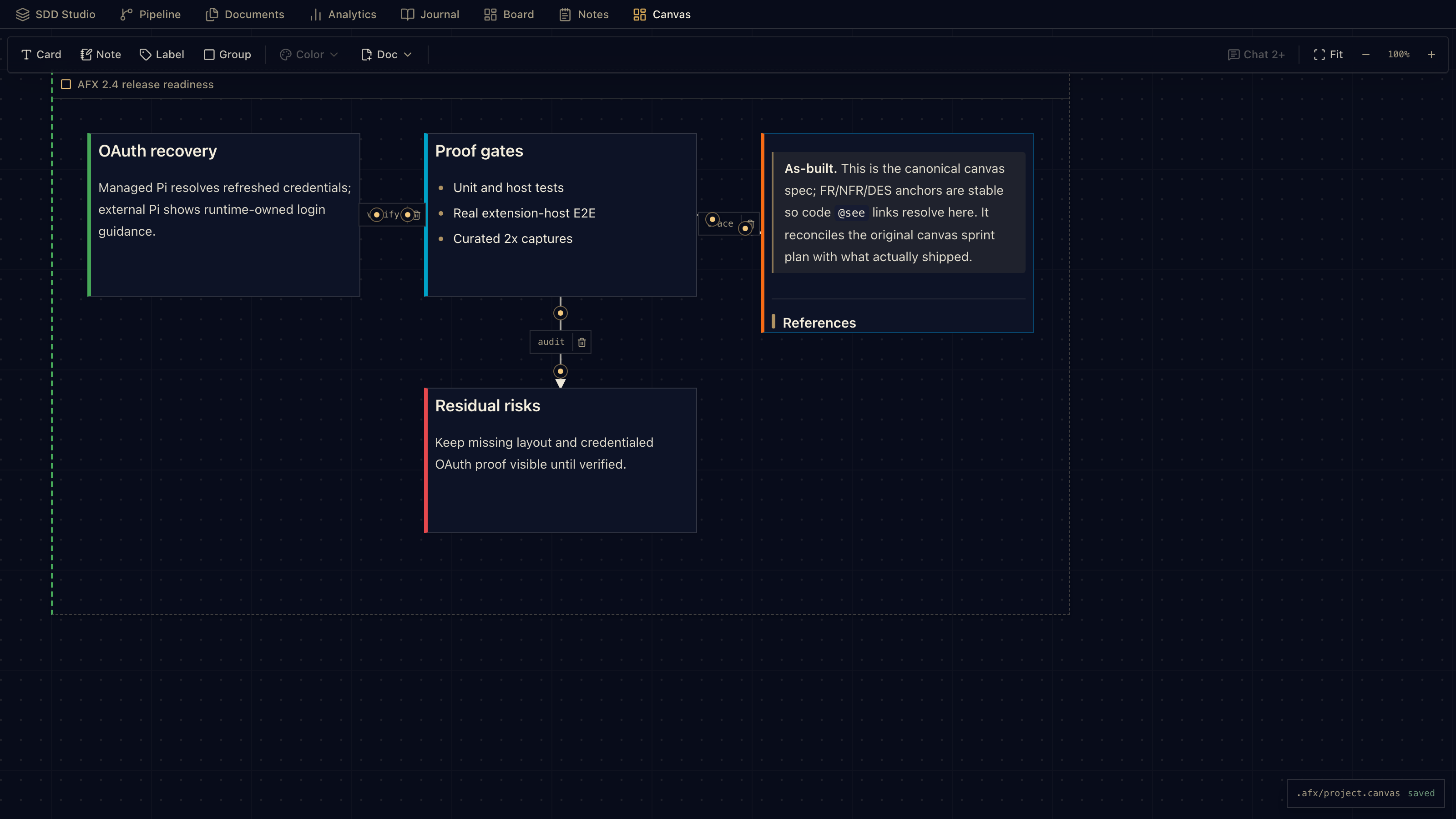
Enable it from VS Code settings with afx.experimental.canvas.
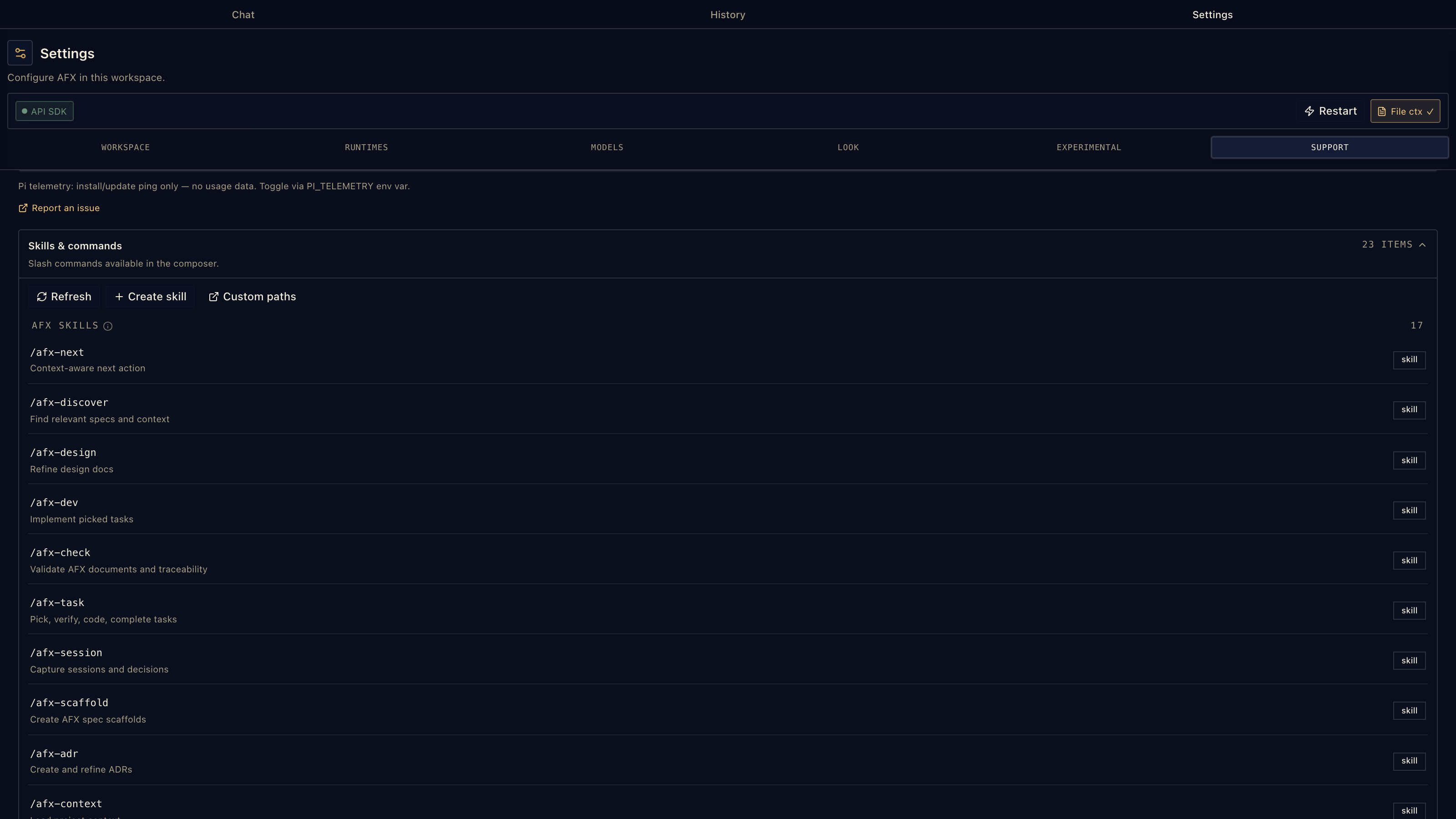
The extension bundles the core AFX workflow skills, and it can also discover standard skills through Pi: project skills, global skills, team packs, and personal skill folders.
That means AFX can run the built-in spec workflow while still respecting the skills your repo already uses. Role packs such as dev, QA, security, architecture, or product can live outside the extension and load as external skills instead of bloating the VS Code bundle.
Skills are loaded from the same places Pi understands:
| Source | Paths / setting | Scope shown in Settings |
|---|---|---|
| Bundled AFX | Extension resources, resources/skills/agenticflowx |
Bundled AFX |
| Pi global | $PI_CODING_AGENT_DIR/skills or ~/.pi/agent/skills |
Global |
| Agent Skills | ~/.agents/skills |
Global |
| Workspace Pi | <workspace>/.pi/skills |
Workspace |
| Workspace AFX | <workspace>/.agents/skills |
Workspace |
| Extra paths | afx.skills.extraPaths entries, absolute, ~/, or workspace-relative |
Custom |
Each skill is a directory containing SKILL.md; nested skill folders are discovered recursively. Settings → Skills shows the loaded command, source path, and scope so you can tell whether a command came from the extension, the user profile, the workspace, or a custom path.
Settings → About shows the exact tagged AFX skill bundle shipped with the installed extension.
Project-local Pi settings, skills, extensions, and packages are guarded by afx.pi.projectTrust (ask, trust, or ignore), and individual Pi tools can be fenced with afx.pi.excludedTools.
Skill loading uses progressive disclosure: names and descriptions stay in the always-on context, while full SKILL.md instructions, references, and scripts load only when the task matches or you invoke the skill directly.
AFX uses the Pi coding harness under the hood: sessions, tools, skills, thinking levels, usage reporting, image-aware model metadata, and a broad provider catalog. Use subscription sign-in, API keys, local runtimes, your installed Pi CLI, or the bundled Pi SDK.
- Subscription sign-in: Anthropic, ChatGPT/Codex, GitHub Copilot, OpenRouter, Kimi For Coding, and xAI. AFX-owned OAuth flows keep subscription credentials out of the chat UI; device-code providers open their verification page automatically.
- API keys: OpenAI, Gemini, DeepSeek, Groq, Mistral, OpenRouter, Bedrock, Azure OpenAI, xAI, Kimi, Qwen token plans, Xiaomi token plans, Z.ai, MiniMax, and more.
- Local runtimes: Ollama, llama.cpp-style servers, LM Studio, vLLM, and OpenAI-compatible endpoints.
- Already on Pi: AFX can reuse your Pi CLI config, sessions, provider auth, and skills.
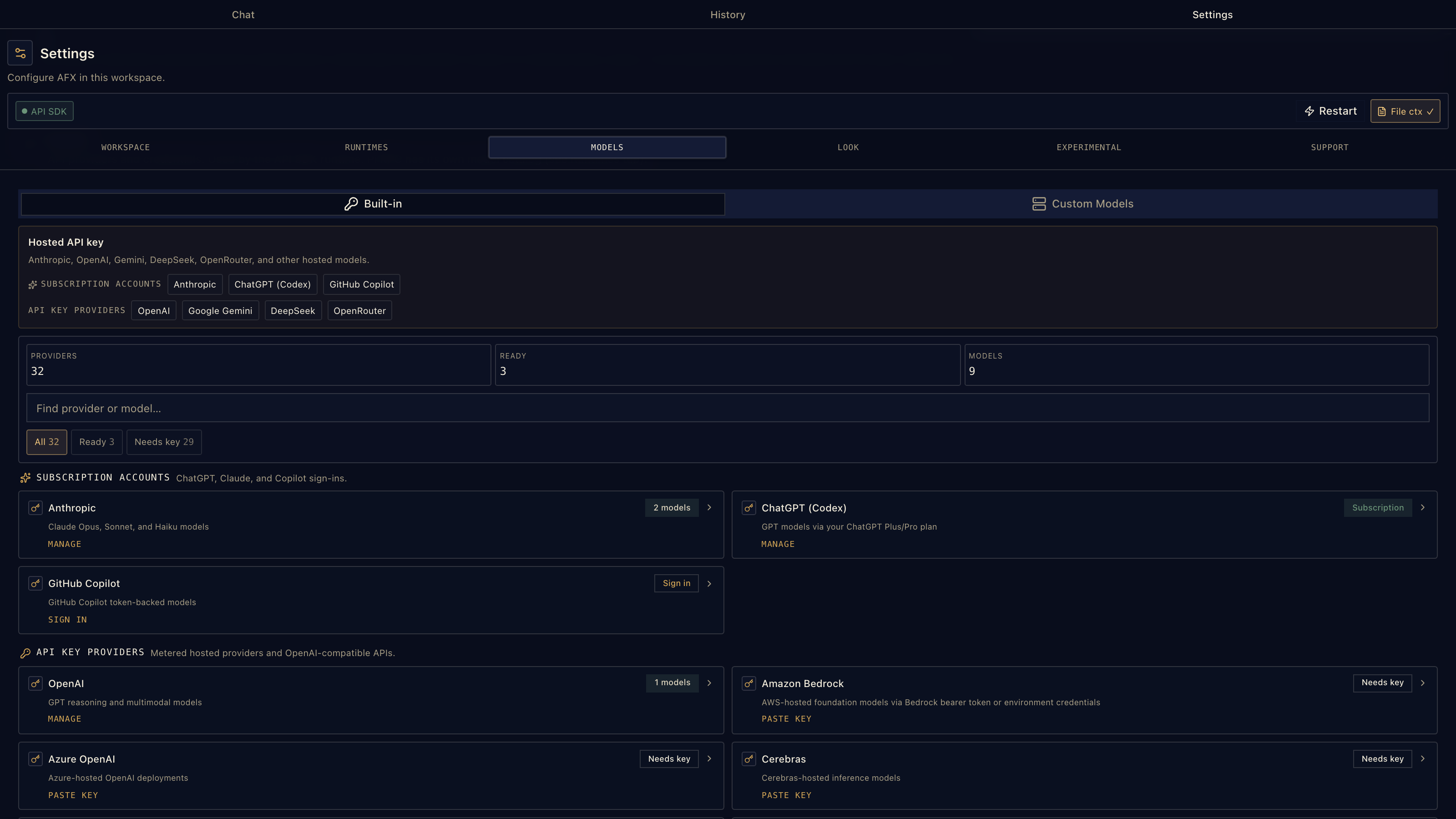
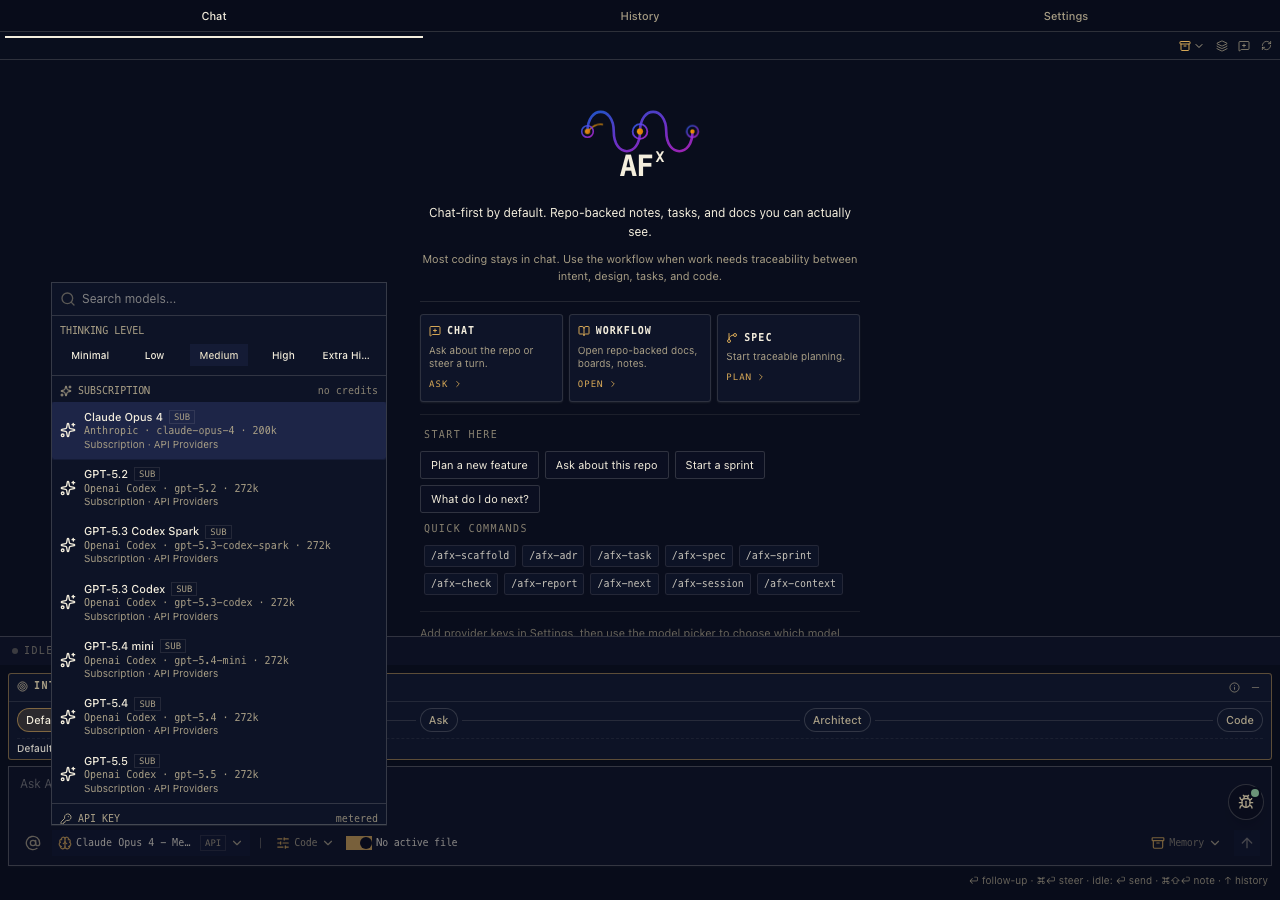
The picker groups configured models by provider, so you can keep a frontier model for design/review, a value model for mechanical edits, and a local model for private work — then switch mid-conversation without losing the thread.
AFX exposes two complementary Pi runtimes. The bundled SDK runs in-process and uses AFX-managed provider settings and VS Code SecretStorage. Pi RPC runs your Pi CLI as a subprocess and keeps Pi's native model catalog, sessions, skills, and authentication in Pi's own configuration. Choose the SDK for the simplest managed setup, or enable RPC when you want the same local Pi environment you use from a terminal.
| Runtime | Runs | Credentials and model setup |
|---|---|---|
| Pi SDK | In the extension host | AFX Settings → Models and VS Code SecretStorage |
| Pi RPC | As a Pi subprocess | Pi config, pi /login, and Pi-native model discovery |
Custom providers are runtime-specific too: SDK providers are managed by AFX, while RPC providers are read from Pi's models.json.
Most people can configure AFX from Settings → Models, Settings → Runtimes, Settings → Skills, and the model picker. Settings → About shows the bundled AFX skill version. If you prefer settings.json, these are the important knobs.
For provider recipes, OAuth setup, and runtime walkthroughs, see Help & setup.
| Setting | Default | Use it for |
|---|---|---|
afx.sdk.enabled |
true |
Use bundled API Providers when a key/sign-in is configured |
afx.sdk.defaultModel |
anthropic:claude-opus-4-5 |
Legacy bootstrap fallback in <provider>:<modelId> format |
afx.sdk.ollamaBaseUrl |
"" |
Point AFX at a local Ollama server |
afx.rpc.enabled |
false |
Enable the external Pi CLI RPC runtime |
afx.agentBinaryPath |
"" |
Use a specific agent/Pi binary |
afx.agentEphemeralSession |
false |
Run without persistent session continuity |
afx.sessionDir |
"" |
Override where agent sessions are stored |
afx.runtime.responseStartTimeoutMs |
60000 |
Increase for slow first-token providers, proxies, or local warm-up |
afx.network.httpProxy |
"" |
Pass an HTTP/HTTPS proxy to AFX-spawned runtimes |
afx.model.defaultSelection becomes the source of truth after you pick a model and is managed by AFX; you normally do not edit either model setting by hand.
| Setting | Default | Use it for |
|---|---|---|
afx.mode.active |
code |
Default composer mode: code, explore, or spec |
afx.composer.intent.slot |
1 |
Default intent slot: Default, Ask, Architect, Code/PRD |
afx.composer.intent.minimized |
false |
Collapse the Intent strip into a smaller one-line control |
afx.context.includeActiveFileContext |
true |
Attach the active editor file to new chat turns by default |
| Setting | Default | Use it for |
|---|---|---|
afx.skills.extraPaths |
[] |
Load extra Pi Agent Skills files/directories outside the default scan paths |
afx.pi.projectTrust |
ask |
Trust policy for project-local Pi settings, skills, extensions, packages |
afx.pi.excludedTools |
[] |
Disable specific Pi tools by name |
Paths in afx.skills.extraPaths may be absolute, ~/ based, or workspace-relative.
| Setting | Default | Use it for |
|---|---|---|
afx.experimental.canvas |
false |
Enable the experimental JSON Canvas tab and Canvas editor |
afx.experimental.workbenchHiddenViews |
[] |
Hide Workbench tabs: workbench, pipeline, documents, analytics, journal, board, notes, canvas |
Hiding a Workbench tab only hides the surface. It does not delete files or disable commands.
| Setting | Default | Use it for |
|---|---|---|
afx.theme |
meridian |
AFX identity/accent theme |
afx.style |
lyra |
Surface treatment: lyra, luma, maia, nova, vega, mira, sera |
| Setting | Default | Use it for |
|---|---|---|
afx.logLevel |
info |
Output channel verbosity: silent, error, warn, info, debug, trace |
afx.debugPerf |
false |
Show streaming performance diagnostics in the chat status bar |
afx.telemetry.enabled |
true |
Anonymous UI analytics; respects VS Code telemetry and Do Not Track |
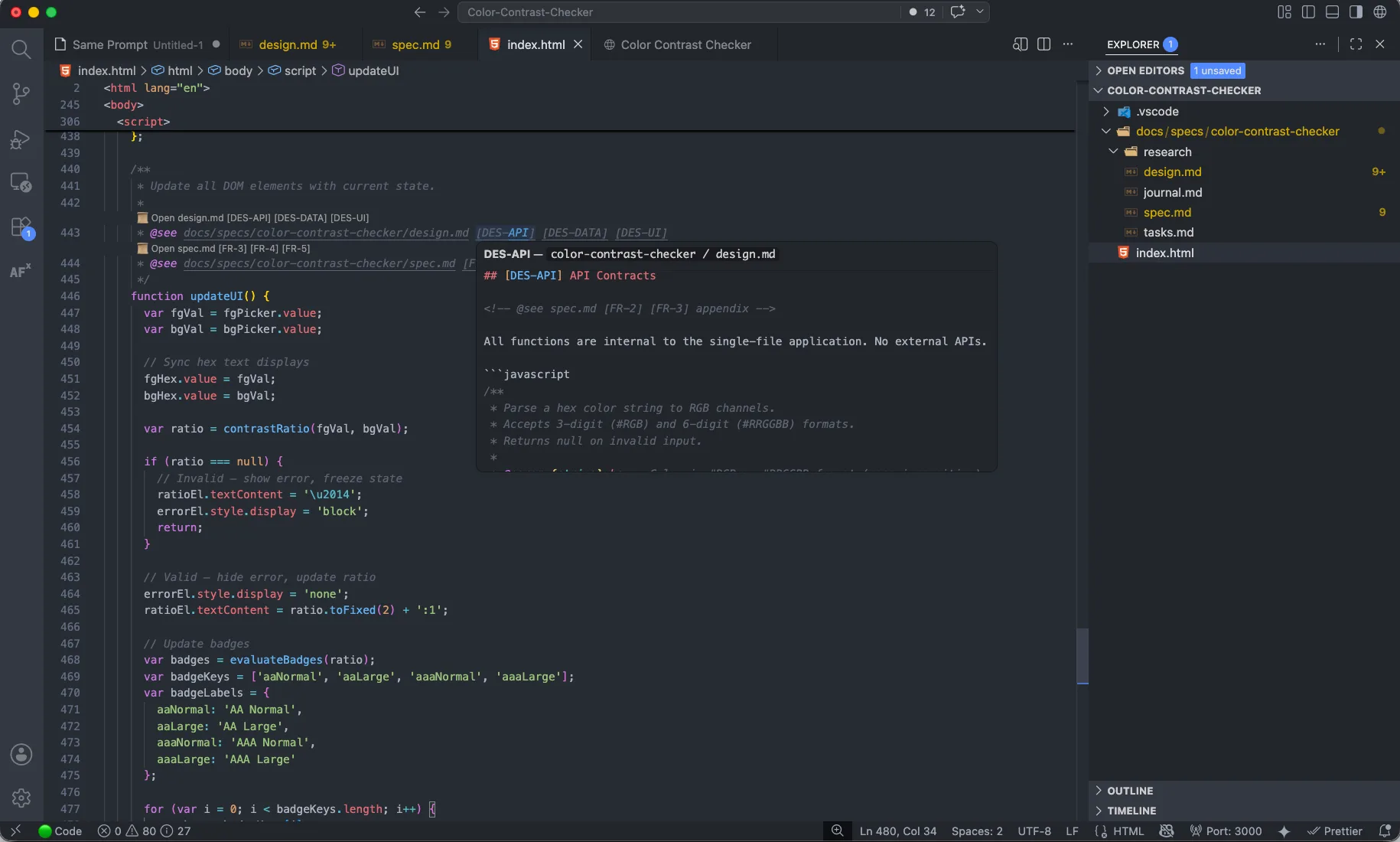
AFX teaches the editor about spec links. @see CodeLens connects implementation back to requirements and design anchors, hover previews show the linked section inline, and go-to-definition jumps to anchors such as [FR-1] or [2.1].
Editor context actions turn selected code into workflow material: explain, review, improve, generate tests, save to notes, insert into composer, verify traceability, or add a new @see link. The result is simple: the code can explain why it exists.
AFX writes durable project memory into the workspace:
| File | Purpose |
|---|---|
docs/specs/<feature>/spec.md |
Requirements, constraints, acceptance criteria |
docs/specs/<feature>/design.md |
Architecture, trade-offs, data models, contracts |
docs/specs/<feature>/tasks.md |
Ordered implementation checklist and verification plan |
docs/specs/<feature>/journal.md |
Session notes, decisions, handoff context |
docs/adr/*.md |
Architecture Decision Records |
.afx/notes.md |
Workbench Notes |
.afx/kanban/*.md |
Workbench Board |
.afx/project.canvas |
Portable JSON Canvas project map |
.agents/skills/, .pi/skills/ |
Workspace-local skill discovery targets |
Everything is diff-able, reviewable, and portable.
AFX periodically upgrades the bundled Pi runtime. Existing Pi RPC configuration remains separate from AFX's in-process SDK configuration. Model capability metadata controls whether image attachments and thinking controls are available, and Settings → Models exposes the providers supported by the installed runtime. Check the changelog for exact bundled-runtime versions and migration notes. If you use custom providers, check the runtime table above before deciding where to configure them.
No VS Code? The workflow also runs as standard skills through the AFX CLI and skill pack.
Claude Code, Codex, Gemini CLI, GitHub Copilot, and Pi-compatible agents can run the same SDD workflow against the same markdown files.
- AgenticFlowX is Apache 2.0 open source.
- AFX-managed provider keys and OAuth credentials are stored in VS Code SecretStorage; Pi RPC credentials remain in your existing Pi config.
- Prompts, file context, and attachments are sent to the model provider selected for that turn. AFX does not host a workflow database.
- Specs, tasks, notes, boards, journals, and canvas files stay in your repo.
- The Canvas is experimental and moving quickly.
- The Meridian UI includes seven style treatments:
lyra,luma,maia,nova,vega,mira, andsera. - Anonymous usage telemetry can be disabled.
Community contributions are welcome. See CONTRIBUTING.md to get started.